Achieving your goals as a public speaker is never easy, and modern tools – especially Microsoft PowerPoint – can hinder as much as help, if used improperly. But a carefully prepared presentation with a clear underlying message, memorable visuals and a focus on making the message useful for the audience can strongly differentiate your speech and help you make a lasting impression. Whether your goal is to find new clients, boost sales, land additional speaking opportunities or generate referrals, all of that will flow from following some basic principles to create an effective and impactful presentation.
The most fundamental idea to grasp is that presentation slides should not be independent documents to be read and understood separately from their accompanying spoken explanations. Slides should enhance what the speaker says, not repeat it.
Much of the conventional wisdom for how to prepare presentation slides is counterproductive. I recently attended a series of excellent presentations that drove home for me just how suboptimal the PowerPoint status quo is. These presentations all starkly departed, to great effect, from the traditional approach of slide after slide of bullet points and text. To better understand and enumerate the characteristics of a standout presentation, I read Garr Reynolds' Presentation Zen: Simple Ideas on Presentation Design and Delivery. The lessons I gleaned follow.
The purpose of presentation slides
PowerPoint is not a word processor. Better software serves that function. Likewise, presentation slides are not as effective when designed as standalone documents to be read and understood outside of the presentation room. Slides do not need to repeat their speaker’s words. Rather, slides serve as visual emphasis and support to make the spoken message more memorable.
Presentation slides that only repeat what the speaker says are distracting for the audience, since people generally have trouble reading and listening simultaneously. When an audience sees a new slide filled with text, the audience will tend to read it; while reading, they may rush to resume listening to the speech. The written words compete with the spoken ones for attention, creating a no-win situation – something the presenter is trying to convey will inevitably get lost. As this point is at such odds with the conventional wisdom about presentations, it bears repeating: People cannot effectively read and listen at the same time!
I struggle with this. My natural tendency is to include many written details in my slides; I worry that otherwise I will forget to say something important. Of course I could and should include those details in my notes instead, but I rarely refer to the notes when speaking, so that worry about forgetfulness still remains.
The solution is to prepare a separate handout for the audience – using a word processor – with all of the key details you want to make sure the audience retains. This handout should be provided to audience members after the presentation ends – what I said about reading and listening at the same time applies even more so here. Let the audience know the handout is coming, so that they do not have to take as many notes, but do wait to provide the handout to so you don’t have to compete with it for attention. One exception is when describing detailed tables or figures; it may be helpful for the audience to have a copy in front of them as well as the slide version may be too small for everyone to see clearly. As for the slides, since they should not work without the accompanying spoken presentation, there is no need to provide a printed copy of them to the audience.
By making sure that all of the important details are in a post-presentation handout, a speaker can dramatically reduce the amount of text included in his or her slides. Bullet points are rarely necessary. Slides should reinforce and highlight what is said rather than repeat it. Replace text with high-quality images and visuals (not clip art) that fill the entire slide; these can be found on a variety of photo archival websites, such as istockphoto.
Such simplicity and visual impact is what makes the presentation memorable.
An example
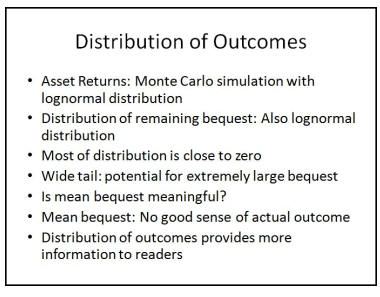
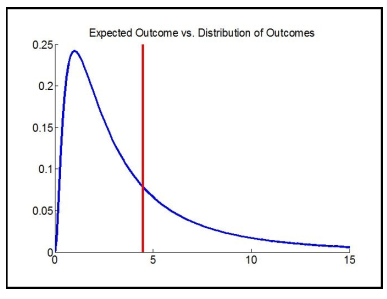
To illustrate, the slide below shows how I might have previously prepared a slide to explain that, when dealing with risky retirement outcomes, looking only at the average outcome does not necessarily provide a clear picture of the range of possible outcomes. But this bullet point list is just a list of the things I wish to avoid forgetting to say to the audience. There is really no reason to include all of this text in a slide.

Rather than including all of this text, I could instead prepare an image to illustrate the point. This illustration below enhances the spoken details, rather than repeating them.
Building a presentation
With an understanding of what your slides should accomplish, the next step is to consider how to best structure your presentation. The initial steps of presentation building should be done on paper, away from the computer. Doing so allows for big-picture thinking about the core messages, and avoids being slowed down by the technical process of slide creation. Sketching on a paper can help to build a structure or flowchart for how to organize the slides without yet worrying about the specific contents of each. With an organizational structure and core messages in mind, slides can then be created.
Your audience may care less about your presentation’s topic than you, so emphasize a clear, essential message and make the audience understand why the point you are trying to convey matters. Make sure that the audience understands the source of your passion. Thinking in terms of story-telling can also keep the audience more involved and make the content more memorable.
Once the presentation is finished, edit it ruthlessly down to its essential core.
Most presentations tend to be needlessly long anyway, and the audience will appreciate when the speaker stays a bit under his or her allotted time. To make your presentation clearer and tighter, it is good practice to think about what you would do if you were asked at the last minute to reduce an hour-long presentation to 30 minutes, or a 20-minute presentation to five. Taking this step will also help if you allow ongoing questions and answers throughout the presentation time, which might create a need to skip some presentation materials. Even though all the content is important (once careful editing has taken place), you should always be sure to know what can be skipped and to know when to stop.
Logistics
Invest in a handheld remote to advance slides without needing to walk over to the computer. When possible, avoid speaking from behind a podium and try to keep as many lights on as possible. A lit room encourages a stronger and more direct connection with the audience since they can better see your body language.
The bottom line
Conventional presentation slides frequently hold a presentation back more than they serve its goals. Preparing slides differently can really be an important way differentiate yourself and your message. Do not be afraid to experiment or to make mistakes when exploring what does and does not work in a unique speaking situation. And remember that the ultimate goal of speaking is to provide something of value to the audience. Ideally, you’ll stand out in your audience’s memory – and, more importantly, so will the message you’re trying to drive home.
Wade Pfau, Ph.D., CFA, is an associate professor of economics at the National Graduate Institute for Policy Studies (GRIPS) in Tokyo, Japan, and the curriculum director for the Retirement Management AnalystSM designation program. He maintains a blog about retirement planning research at wpfau.blogspot.com
Read more articles by Wade Pfau